How to Add a Free WhatsApp Button to Your Website

Want a simple way to let customers message you directly via WhatsApp?
Adding a “Book on WhatsApp” button to your website makes the process fast and convenient for everyone. Whether you run a guesthouse, a local service, or an online shop, this tool helps you capture leads instantly.
Instead of losing people to slow email threads, visitors can simply select their dates or details and send a pre-filled message straight to your phone. It's a seamless transition from your website to a real conversation.
Our WhatsApp widget is built to work on any platform; from WordPress, Wix, Springnest, or Squarespace to custom-built websites. No complex plugins and definitely no coding required. Just add a simple embed code to get you up and running in minutes and get more direct bookings.
Have questions? Contact us.
Why Add a WhatsApp Booking Button?
In South Africa, almost everyone online – 98% – uses a mobile phone, and 94% of adults are active on WhatsApp. That makes a WhatsApp button on your website a total no-brainer.
Most of your visitors are already browsing on their phones. By giving them a familiar way to reach you, you remove the friction of filling out long forms or waiting for an email reply. It means fewer lost leads and more instant conversations that turn into direct bookings or sales.
It's the simplest way to meet your customers exactly where they already are. (Source)
Why Add a WhatsApp Booking Button?
- Instant Communication – Start the conversation immediately. No more losing leads while they wait for an email reply.
- Zero Friction – Visitors don’t have to fill out long, boring forms. They just tap and send.
- Pre-filled Booking Info – The app handles the details for you. Dates, services, or inquiries are sent in one neat message so you know exactly what they need.
- Universal Compatibility – It works perfectly on WordPress, Wix, Springnest, Squarespace, or any custom-built site.
- Mobile-First Design – Since most South Africans browse on their phones, you're giving them the easiest way to connect on a platform they already trust.
How it works: Get Your Smart WhatsApp Button in 5 Minutes
Turn visitors to a booking customer by meeting them where they are – it’s straightforward, and incredibly user-friendly.
How to Get Started: Your Smart WhatsApp Button in 5 Minutes
You don’t need a developer or any coding skills. Get a professional WhatsApp booking button, with a calendar, live on your website is as easy as 1-2-3-4.
Step 1: Create Your Account
Sign up for our app in just a few clicks. You’ll instantly access your dashboard where you can manage all your WhatsApp widgets.
Step 2: Choose Your Template & Configure
Select a pre-designed template that fits your brand. Configure the general settings – like which WhatsApp number you want messages sent to and what your default pre-filled message should be.
Step 3: Design & Polish Your Widget
Choose which interactive elements to add. You can enable the date-picker panel for availability inquiries or integrate it with your booking system. Make it look professional with your brand colors.
Step 4: Publish & Embed
You’ll receive a small, simple line of embed code. Simply copy that code and paste it into the backend of your website.
Where Should I Place My Button?
Our app gives you complete flexibility. You can choose to display your smart button:
- In the Corner: The classic and highly effective floating icon will display in the corner of every page on your site, always ready for a customer’s inquiry.
- On Specific Pages: Only display the booking form on your “Tours” or “Availability” page.
- In the Header or Footer: Integrate the button design directly into your site’s standard navigation for a seamless look.
Beyond Just a Button: Smart Booking Tools
Most WhatsApp buttons just open a blank chat. Our app does the heavy lifting for you by gathering the right info first to save you even more time going back and forth:
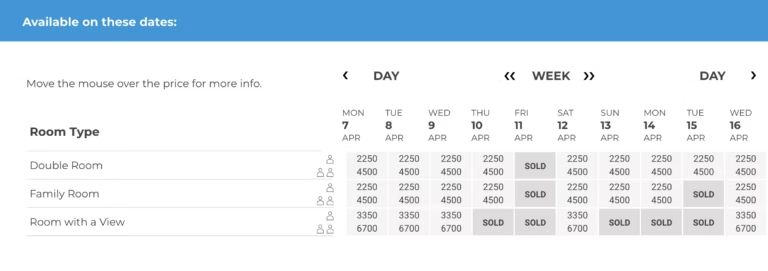
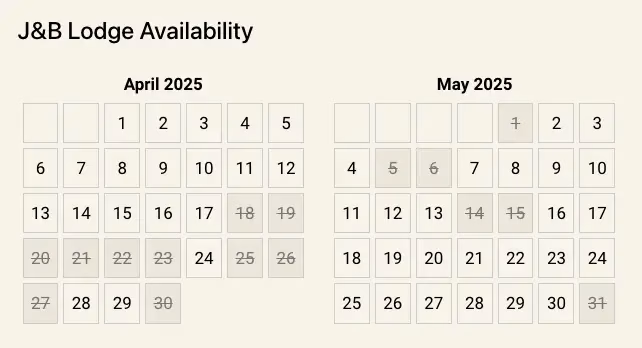
- Interactive Booking Panel – When a visitor clicks the button, a sleek panel opens on your website. Visitors can then select their dates immediately, so the message landing in your WhatsApp isn’t just a “Hello,” but a specific inquiry with the dates and room they want.
- NightsBridge Real-Time Integration – Take it a step further by connecting your live inventory. The app checks your actual availability and lets the guest pick their room before sending you the message.
- Perfectly Pre-filled Messages – You receive a message that includes the Room Type, Check-in/out Dates, and Total Nights. No more back-and-forth asking for details, you get everything you need to close the booking in one tap of the button.
Select dates and enter details
Details confirmed and passed to WhatsApp button
Get Guests to Book on WhatsApp
- A simple form collects basic booking details
(date range calendar, number of guests, accommodation type). - The form automatically formats the details into a WhatsApp message.
- When the visitor clicks on the Book on WhatsApp button, it sends the message directly to your WhatsApp number with one click.
Add This Custom Code to Your Website
Below is the custom HTML code you will use. Simply replace the “slider_id” and “ref” with your actual embed code in the format below, and you’re good to go:
Embed Code:
<div class="achecker-slider"></div>
<link rel="stylesheet" href="https://website/embed/widget.css">
<script src="https://website/embed/widget.js?slider_id=XX&ref=XXXXXX" async></script>Start Boosting Your Direct Bookings Today!
Adding a WhatsApp button is one of the quickest ways to simplify your booking process and stop losing leads. Customers love the ease of instant messaging, and you get the benefit of direct, personal contact without the middleman.
Whether you’re running a guesthouse, a professional service, or a niche shop, it's all about making it easy for people to say “yes.”
Ready to try it out? Sign up to grab your embed code and get your visitors to book directly via WhatsApp today!
If you run into any local quirks or need a hand getting it live on your specific site – whether that’s WordPress, Springnest, or a custom build – just give us a shout.
We're here to help you get it 100% right.
Built for Agility: The Essential Add-On for Agencies & Web Designers
We know that modern web agencies and independent web designers are responsible for building the sites that power the tourism industry. That's why we built this app to be completely platform-agnostic and incredibly simple to implement.
Whether you are building on WordPress, Wix, Springnest, Squarespace, Laravel, or a custom stack, our widget integrates with just a light embed code. It offers your clients a high-value, high-converting feature without adding complex backend logic or performance-heavy plugins for your development team to maintain.
It is the quickest way to add a sophisticated, conversion-focused tool to your next hospitality build.